
SUIBROKERS DAO · field note
How to swap SUI to USDC on Sui with SUI BROKERS
A practical guide to Bluefin 7K quotes, the exact 30 bps partner commission, slippage tolerance, confirmed Points, and recovery states.
To swap SUI to USDC in SUI BROKERS, connect a Sui mainnet wallet, choose the supported assets, request a Bluefin 7K quote, review the route and output, then explicitly approve the wallet transaction. A quote describes a possible execution; it is not an executed trade.
The current Swap flow
- Open the Swap surface.
- Connect a Sui mainnet wallet when you are ready to act.
- Choose the input asset and USDC as the asset you want to receive, then enter the amount.
- Review the returned route, fee, output, minimum received, slippage tolerance, and expected Points.
- Approve every wallet transaction explicitly in your wallet.
- Wait for the transaction to confirm before treating the swap as completed activity.
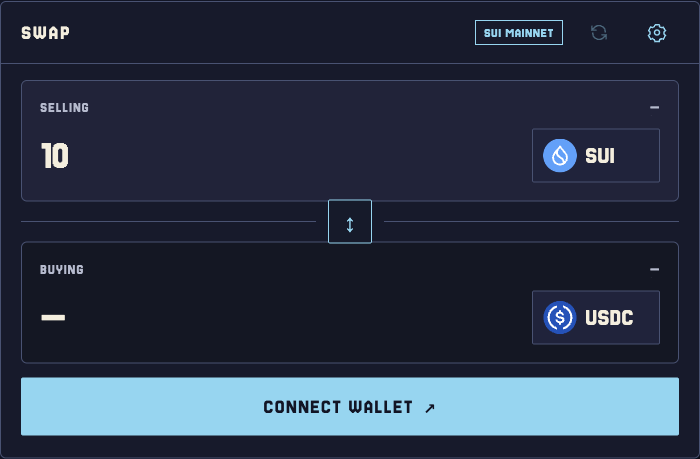
Before connecting a wallet, the Swap entry shows 10 SUI in Selling and no Buying output, with Connect Wallet available (captured 30 September 2026). It is an entry screen, not a live quote or an executed trade.
The current route is Bluefin 7K. A disconnected wallet can enter an amount, but it cannot request a live quote or submit a swap. Supported assets and the returned route come from the live product; a catalogue entry is not a promise that a route will execute.
Fee, gas, and slippage are different facts
The configured partner commission is 30 bps, which is 0.30%. As an educational calculation, a $100 gross base × 0.30% = $0.30 equivalent. That figure is the commission rate applied by the configured route; it is not the total cost of a trade and it is not the actual output of a quote. The live quote remains the source for the amount you will receive.
Network gas is separate. It pays Sui computation and storage for the transaction and can vary with the transaction; it is not the 30 bps partner commission. See the Sui gas documentation for the network-side explanation. Slippage is a tolerance for how far execution may move from the quote, not an additional charge. The app's minimum received value reflects that tolerance.
The provider quote already carries its own output and commission terms. Do not subtract another 0.30% from a provider output that already includes the commission-adjusted amount, or you will count the same fee twice.
How verified Swap Points are calculated
The current rule is:
Every $4 of verified Swap volume = 1 Point
For example, $100 of verified gross Swap volume corresponds to 25 Points under that rule (100 ÷ 4 = 25). This is an educational volume example, not a required single trade and not a fee rebate. The app may show expected Points beside a quote, but the ledger credits Points only after the signed transaction is confirmed and the swap is verified.
If the next step does not complete
- Wallet approval rejected: no transaction was signed or sent. Remain on the Swap surface, check the wallet and amount, and request a fresh quote when needed.
- Route unavailable: the app has no usable quote and does not build a transaction. Check the selected pair and amount, then retry later.
- Confirmed but history or indexing is pending: do not sign the completed trade again. The app can show that the swap is confirmed while Sui indexing or SWAP history synchronization catches up; use Refresh to retry wallet data and history.
These states are why the explicit wallet, Sui mainnet, and confirmed-verified conditions matter. Activity before Season 1 remains visible in history but earns no seasonal Points.
If a wallet follows a partner link, attribution is associated after that wallet explicitly connects. The first valid referral wins; opening a ref URL alone does not attribute activity. Read the partner attribution rules if you are sharing the Swap flow.
Limits and next actions
Before signing, compare the displayed route, fee, output, and minimum received with the action you intend to authorize. Then use the Swap documentation for the source-of-truth wording and Farm thresholds and Broker NFT allocation for the current Farm thresholds.
The Points rule does not guarantee an NFT, reward, revenue payment, liquidity, or return.
Common questions
Can I get a quote without connecting a wallet?
No. A disconnected wallet can prepare an amount, but it cannot request a quote or submit a swap.
When do Swap Points become credit?
After the wallet-signed transaction is confirmed and the service verifies the swap. Points beside a quote are expected Points until then.
Does a referral URL alone attribute my swap?
No. The wallet must explicitly connect through the partner link, and the first valid referral wins.