
SUIBROKERS DAO · field note
Teaching MCP setup in a builder community
A practical builder lesson covering initialization, tool discovery, schemas, read-only calls, errors, and approval boundaries.
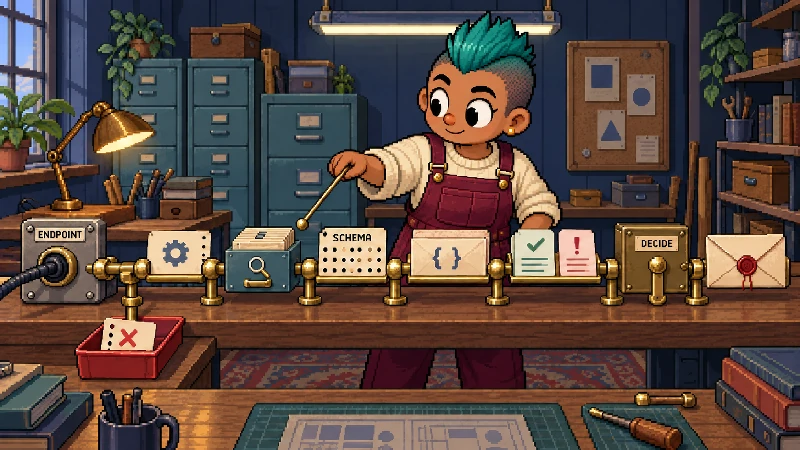
An MCP lesson should teach the connection as a protocol boundary: endpoint, initialization, tool discovery, schema, call, result, and user decision. A builder community learns more from one traced read-only call than from a list of fashionable host names.
Teach the handshake in order
Begin with the endpoint and allowed origin. An MCP host connects, initializes, and asks what the server exposes. The server returns tools with names, descriptions, and input schemas. The host then chooses whether a model may use a tool and sends a structured call. The server validates the input and returns typed content or an error.
The MCP TypeScript SDK describes this model: a server exposes tools, resources, and prompts, and a host connects to them. Its examples use schema validation before a handler runs. That is the useful lesson: discovery is data, and the schema is part of the contract.
Use one read-only example
Give the group a status call with no wallet and show the complete result: service state, source origin, and asOf. Then show a wallet-scoped history call with a canonical address. Ask participants to identify the endpoint, input fields, response state, and evidence timestamp.
For a negative case, use an unknown origin or malformed wallet. The expected behavior is rejection before an upstream read. A server should not silently accept an arbitrary Host, normalize an unsafe path, or turn an invalid address into a different account. Make the error part of the lesson.
The SUI BROKERS participant kit is intentionally narrow. It exposes six public tools: status, season, swap history, Desk, partner activity, and a review-only action plan. The first five make bounded GET requests. The plan maps a possible swap, Desk action, partner task, or points review to an app route and does not accept prefilled query parameters. It never quotes, builds, signs, sends, activates referrals, or mints an NFT.
Explain the host boundary
MCP connects a host to tools; it does not decide which model, account, wallet, or permission policy the host uses. Claude Code documents remote HTTP and local stdio installation, while other hosts may expose different connectors. Gemini and DeepSeek are provider names here, not proof of native support for a particular server. Builders should document the host, transport, authentication, version, and user approval behavior they actually tested.
When a tool can lead to money or identity changes, keep the final action in the application and wallet. A model’s tool call is an instruction for the host or server; it is not a signature. A successful plan is not a transaction, and a returned history row is not evidence beyond the source and timestamp it carries.
Let the exercise end with a trace
Ask each participant to write a six-line trace: initialize, list tools, validate input, call tool, return result, decide next step. Have them mark where an error would stop the flow and where a user must review an external action. Link to the existing MCP connection note and the wallet-dev-tools comparison for follow-up.
The lesson is complete when builders can publish a server that is discoverable, typed, source-aware, and honest about side effects. That is more durable than promising that any model will “just connect.”